
MISAll Back Office — Complete User Manual · MISAll Business Manager (Enhanced Edition) — Complete User Manual
MISAll · DOC-009 · Getting started and data safety
Back up, restore and protect business records
A database backup is written to a server-side path, which may not be on the workstation you are using. Restore overwrites the target company.
Steps
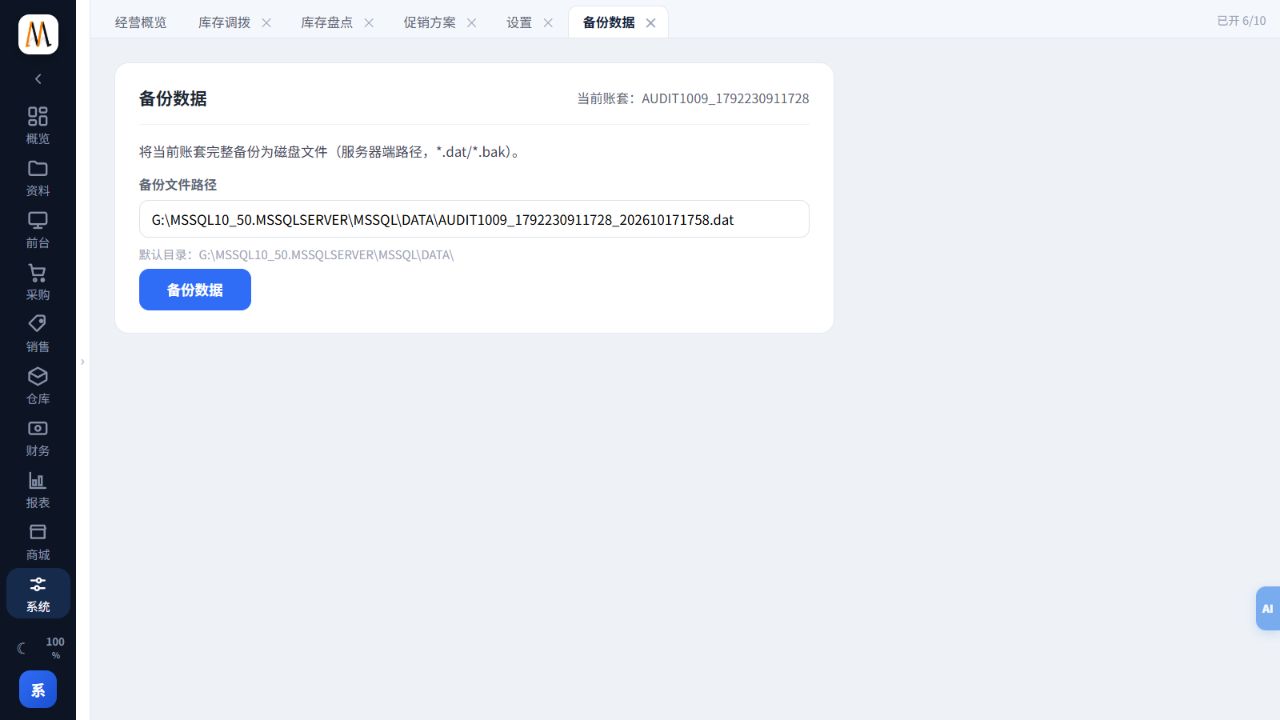
- Open System → Backup Data and verify the company and destination. Record the complete path from the success message.
- Confirm the file exists on the server and retain an independent copy according to your business policy. A screenshot is not a backup.
- Before restoring, verify the target company, backup timestamp and scope. Back up the current state and have other operators exit.
- The responsible administrator selects the correct server-side file in Restore Data, checks the overwrite warning and proceeds. Sign in again and inspect key documents afterwards.
- Periodically test recovery in an isolated environment. Rebuilding the system, deleting a company and recalculating cost are separate maintenance actions.
Check the result
You can locate a usable backup, identify its company and date, and refer to a recovery test record.
Notes and troubleshooting
The screenshot demonstrates the backup page; its example path is not a destination to copy onto your own server.
