
MISAll Back Office — Complete User Manual · MISAll Business Manager (Enhanced Edition) — Complete User Manual
MISAll · DOC-057 · Payments and business reports
Query, filter, export and print reports
Choose the business scope before dates, warehouse and counterparty filters. A truncated result is not a complete dataset.
Steps
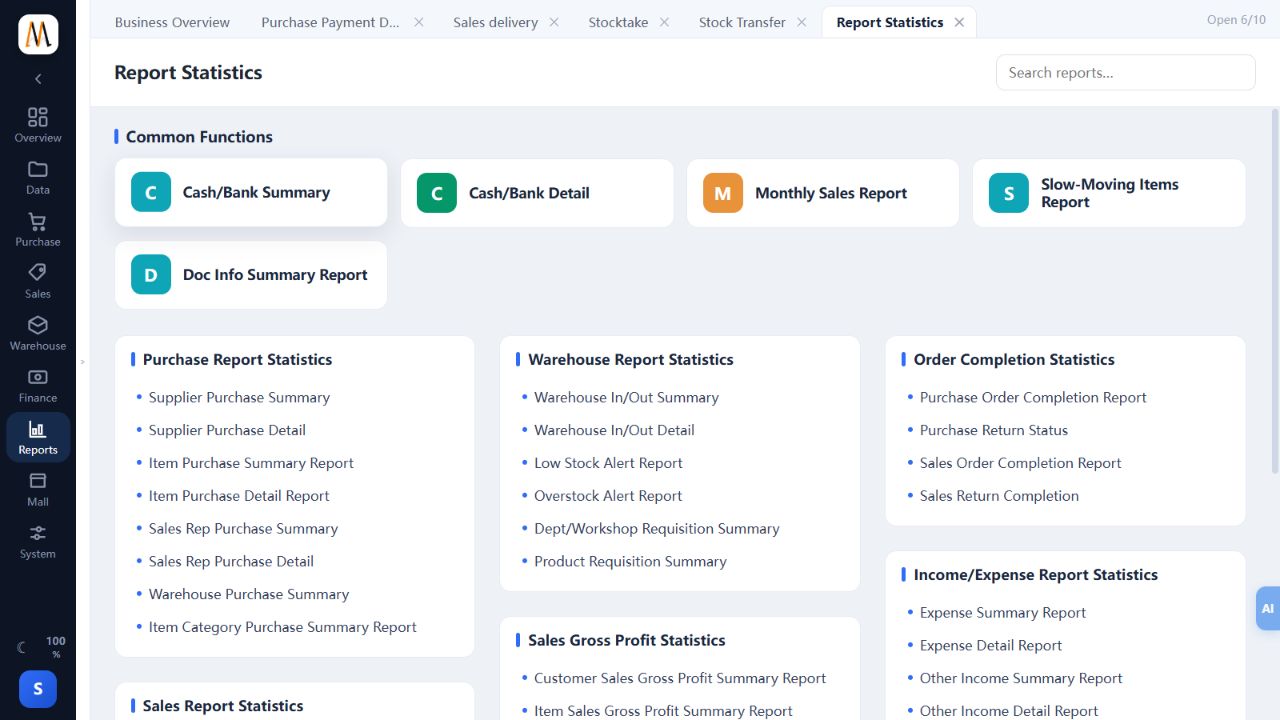
- Open Reports → Report Statistics and search a report or browse purchasing, sales, stock and finance categories.
- Set the dates and relevant filters, then confirm treatment of returns and business sources.
- Use advanced conditions when needed; recheck company and report scope when loading a saved query.
- Drill from summary to detail and original documents. Inspect totals and row-limit notices, narrowing or splitting the period if necessary.
- Preview filters and columns before Excel/PDF export or printing. Tax, multi-unit and cost-permission restrictions apply consistently.
Check the result
Screen, exports and printouts use the same scope and can be traced to source documents.
Notes and troubleshooting
The report-centre screenshot shows navigation. Availability depends on company setup and permissions.
