
MISAll · DOC-011 · Checkout and shifts
Scan, search, change quantities and sell unbarcoded items
POS accepts barcode scans, text searches and touch selection. Check the selected variant, unit and price every time.
Steps
- Focus the product input field and scan. Without a scanner, enter a name or item code, press Enter and select the correct result.
- For multiple identical items, scan again or use the quantity function. Check the merged quantity and keep scans out of numeric editing fields.
- Before switching units, confirm the conversion and unit barcode are configured. A case and a bottle have different prices and stock quantities.
- Choose the required colour or size for a variant; its full barcode identifies that variant directly. Use the authorized unbarcoded-sale function for items without a barcode.
- Delete the incorrect unpaid line. Clear the entire basket only when abandoning that unpaid sale; completed transactions require the appropriate return process.
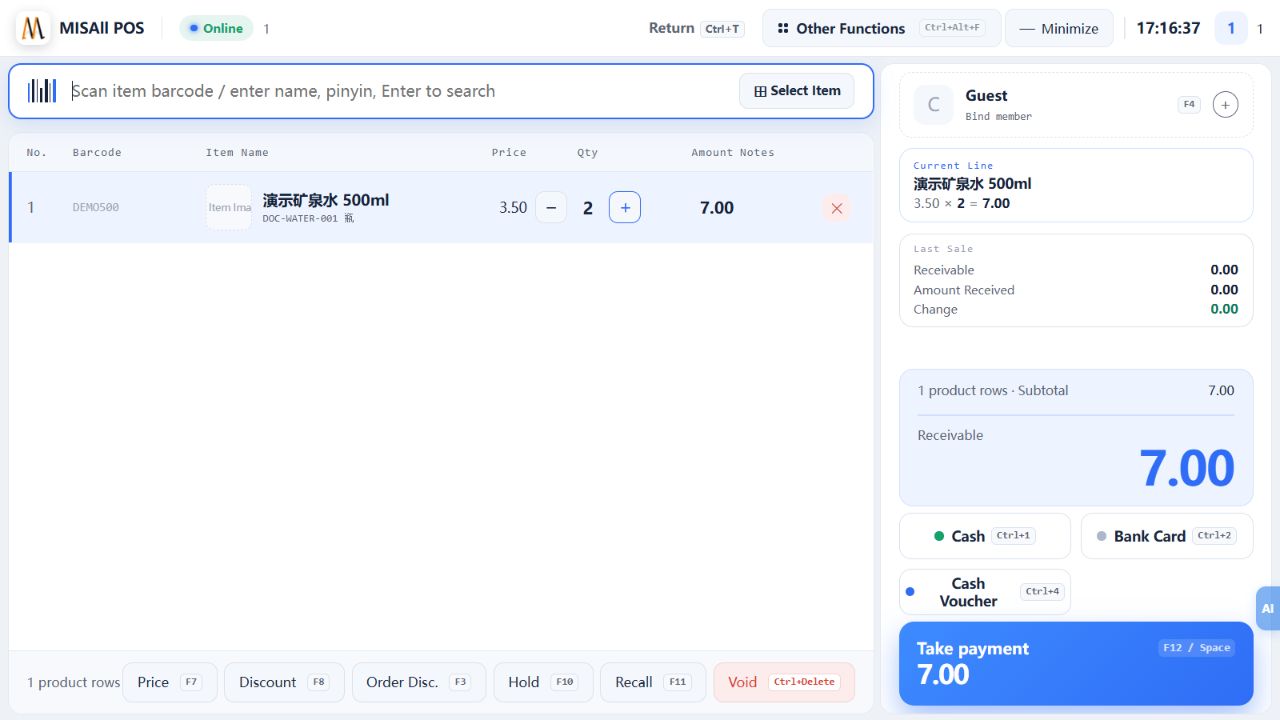
Check the result
Basket lines, quantities and total agree with the goods being purchased.
Notes and troubleshooting
Investigate missing barcodes, inactive products, local copies and variants before creating a duplicate item.
