
MISAll · DOC-059 · Enhanced Edition workflow
Enhanced Edition start-up: products to sellable stock
MISAll Business Manager starts with product and counterparty records, then approved receipts establish stock. POS checkout is not a prerequisite.
Steps
- Create products, suppliers, customers, warehouses and settlement accounts using chapters 028, 032 and 033.
- Decide whether you are opening with existing stock or recording new purchasing. Use opening stock for the former and receipts for the latter without duplicating goods.
- Complete a receipt as in chapter 038 with actual quantities and units, then save and approve.
- Verify item, warehouse and quantity in Current Stock before selling.
- Use the ten-bottle example only in practice; live quantities and costs must come from real business evidence.
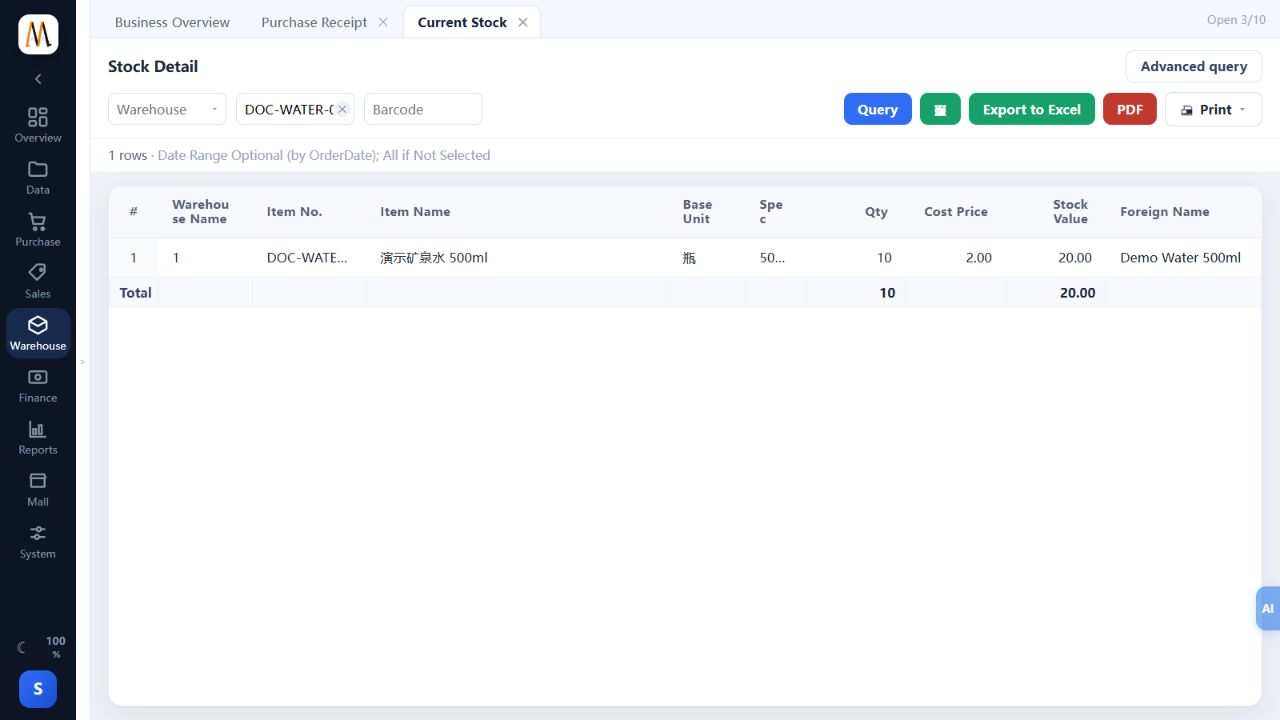
Check the result
Products have traceable stock in the intended warehouse and can enter the delivery workflow.
Notes and troubleshooting
Enhanced Edition has no POS membership/promotion management, Audit Centre or tax-authority interface. Do not change shared company settings merely to seek those menus.
